
Dealmakers and investment professionals spend a significant amount of time manually uploading files, waiting for responses, downloading outputs, and re-uploading revised versions.
Every click between tabs breaks focus and adds unnecessary overhead to high-stakes analytical work.
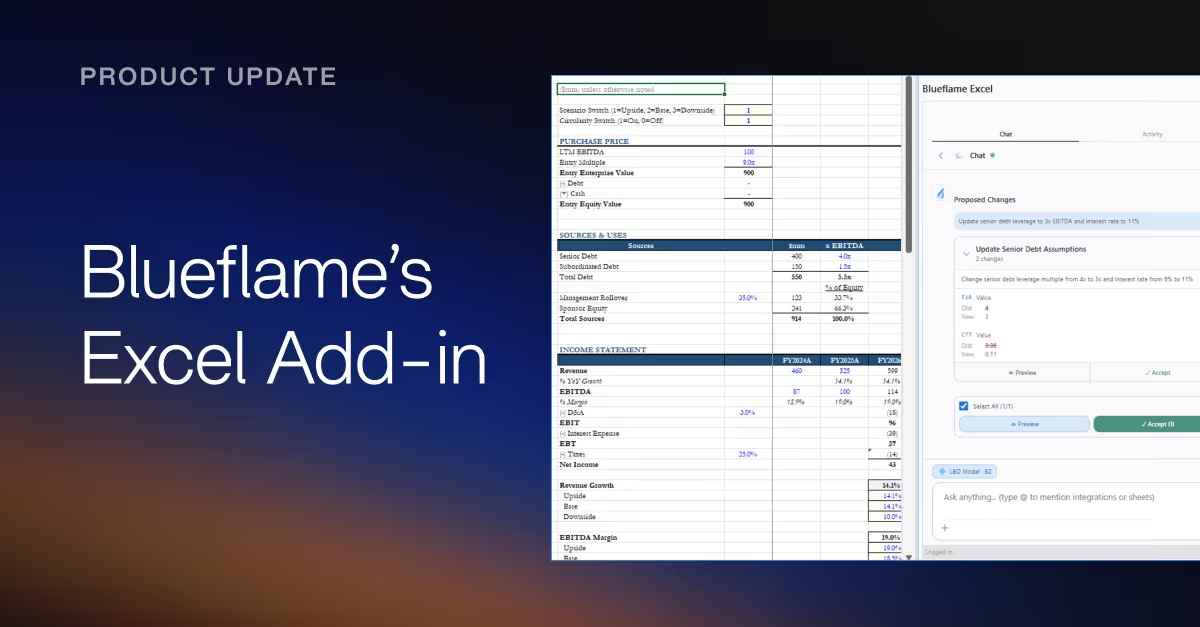
The Blueflame AI Excel add-in works natively inside Excel, enabling you to move faster without breaking your workflow.
Unlike uploading files to a web platform or using general-purpose AI tools, the Blueflame AI Excel add-in is designed for deal teams who need to quickly ask questions, analyze data, and refine financial models in real time.
A single workspace for seamless financial modeling and analysis
The Blueflame AI Excel add-in brings institutional-grade AI directly into your spreadsheets using a sidebar interface, so you can work on financial models without uploading or downloading a single file.
- AI querying within Excel: Ask questions directly against your open spreadsheet — no file upload required; receive cited, accurate answers in the sidebar without switching applications.
- Financial model creation and validation: Create new financial models from scratch, audit existing spreadsheets for errors or inconsistencies, and update models with new data.
- Real-time financial model iteration: Edit, update, and refine spreadsheets; the Blueflame AI Excel add-in maintains context in the conversation so you can iterate rapidly without restarting.
- Connected data intelligence: Tap into BlueflameAI’s full intelligence layer, including internal files and data rooms, so answers are grounded in your firm's proprietary context, not just the open spreadsheet
See what’s possible with the Blueflame AI Excel add-in:
How dealmakers and investment professionals use Blueflame AI’s Excel add-in
The Blueflame AI Excel add-in supports the following AI use cases for dealmakers and investment professionals:
- Building LBO models: Generate a first-draft LBO model, update existing models, and build out analyses withinexisting workbooks from connected deal materials and web research.
- Completing DDQs and diligence questionnaires:Answer due diligence questions by searching connected data room and internal files directly within your Excel-based DDQ template.
- Validating diligence assumptions: Cross-check model inputs against data room documents and flag inconsistencies in real time, without switching between tools.
- Auditing spreadsheet errors: Identify formula issues, broken links, and logic inconsistencies across complex multi-tab models, with summaries and suggested fixes.
- Monitoring portfolio company KPIs: Search live portfolio data to surface variance vs. budget, flag under-performers, and generate narrative updates forLP reporting.
Frequently asked questions
How is the Blueflame AI Excel add-in different from using AI tools outside of Excel?
Unlike general-purpose AI tools that require file uploads and downloads, the Blueflame AI Excel add-in enables Blueflame AI to operate natively within Excel.
Do I need to upload my spreadsheets to use the Blueflame AI Excel add-in?
No, the add-in works directly on your open Excel spreadsheet, so there’s no need to upload or download files.
What kind of questions can I ask within Excel?
You can ask natural language questions about your model, such as validating assumptions, modifying existing workbooks, explaining calculations, identifying errors, summarizing data, or pulling insights from connected sources.
How does theBlueflame AI Excel add-in help with model validation and auditing?
The add-in can scan spread sheets to identify formula errors, broken links, and logical inconsistencies.
Can I iterate outputs in real time?
Yes, the add-in maintains conversational context, allowing you to ask follow-up questions, refine assumptions, and drill deeper into your model without restarting your workflow.
What data sources does the Blueflame AI Excel add-in use?
The add-in connects to your firm’s internal data ecosystem – including files, data rooms, CRM systems, and emails – and connected data sources, ensuring outputs are grounded in proprietary and relevant information.
Bring AI-powered financial modeling and analysis Into Excel with Blueflame AI
Whether you're building an LBO model, validating diligence assumptions, or preparing an IC memo, the Blueflame AI Excel add-in keeps your workflow fast, connected, and entirely within Excel.
Existing customer?
👉 Log into Blueflame AI and head over to our Help Center for getting started guides, tips and tricks, and more.
New to Blueflame?
👉 Request a demo to see how Blueflame AI gives deal teams a seamless way to work with their models withoutever leaving Excel.